iOS folders.
Right in your Dock.
Group apps and files into a Dock folder with swipeable pages, drag and drop, and one-click access.
Download on the App Store
macOS 14 or later
Additional folders require Companion
Why this app
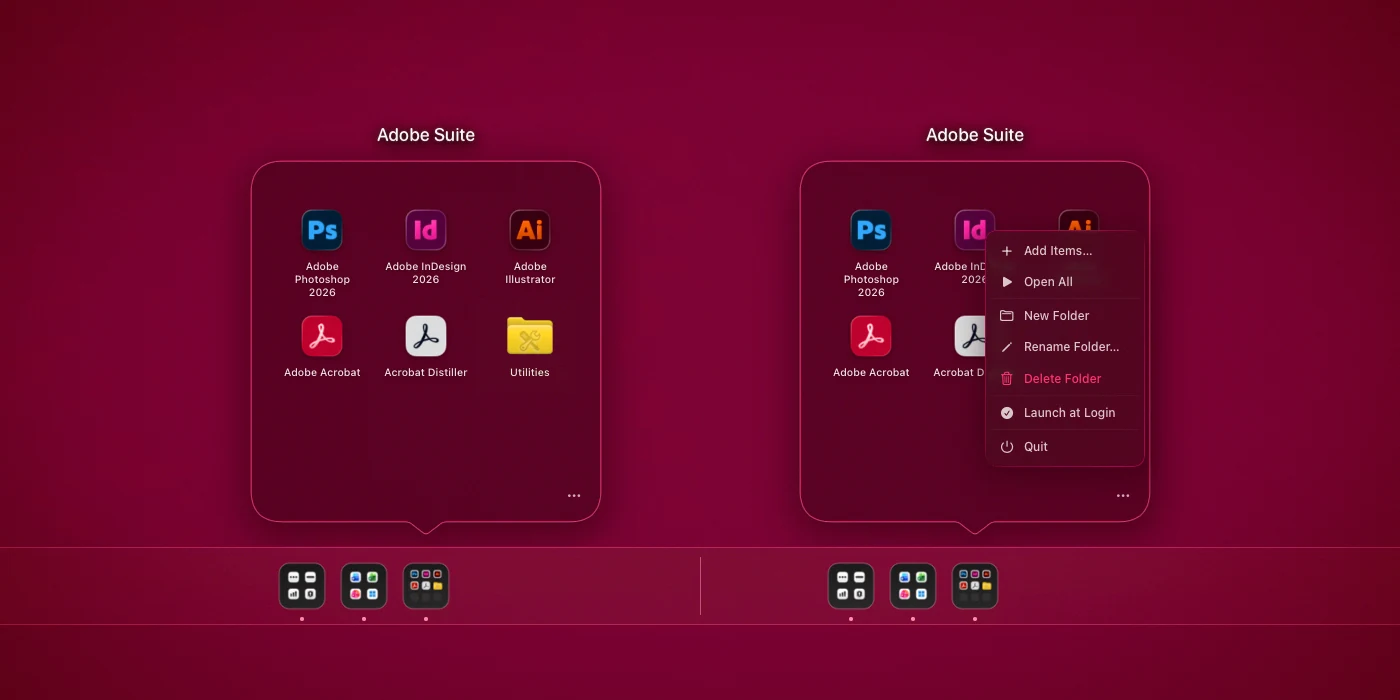
The macOS Dock has stacks, but they don't feel like folders. FolderDock gives work apps, design tools, project folders, and documents a cleaner home in your Dock: click a folder icon, see a focused grid, swipe between pages, and keep the Dock useful without turning it into a long row of icons.
Dock-native
- Real Dock icon — not a stack, not a Finder popover
- A dynamic Dock icon reflects the apps inside your folder
- Click the icon to open the folder panel above the Dock
- Keeps your most-used apps and files one click away
- Reduces Dock clutter without hiding everything in Launchpad
iOS-style folder panel
- Apps and files arranged in a clean 3×3 grid
- Swipe horizontally between pages when a folder has more than nine items
- Reorder items inside a folder by drag and drop
- Add items from Finder, the panel, or the Dock menu
- Right-click any item for Open, Show in Finder, or Remove
Drop files onto apps
- Drag a file onto an app icon inside a folder to open it with that app
- Open one image with Photoshop, the next with Preview — without leaving the Dock
- Folders and compatible apps accept drops like Finder
- Drop targets light up and scale gently for clear feedback
Native macOS
- Native SwiftUI with light and dark mode, subtle animations
- Fully sandboxed for Mac App Store distribution
- Localized interface for international App Store users
- No external service, no account, no tracking
No data collected
FolderDock processes everything on your device only. No external servers, no analytics, no tracking.
Read the full privacy policy.