
See who talks.
And what listens.
Keep track of live traffic and system activity on your Mac, right from the menu bar.
Advanced mode requires Companion
Why this app
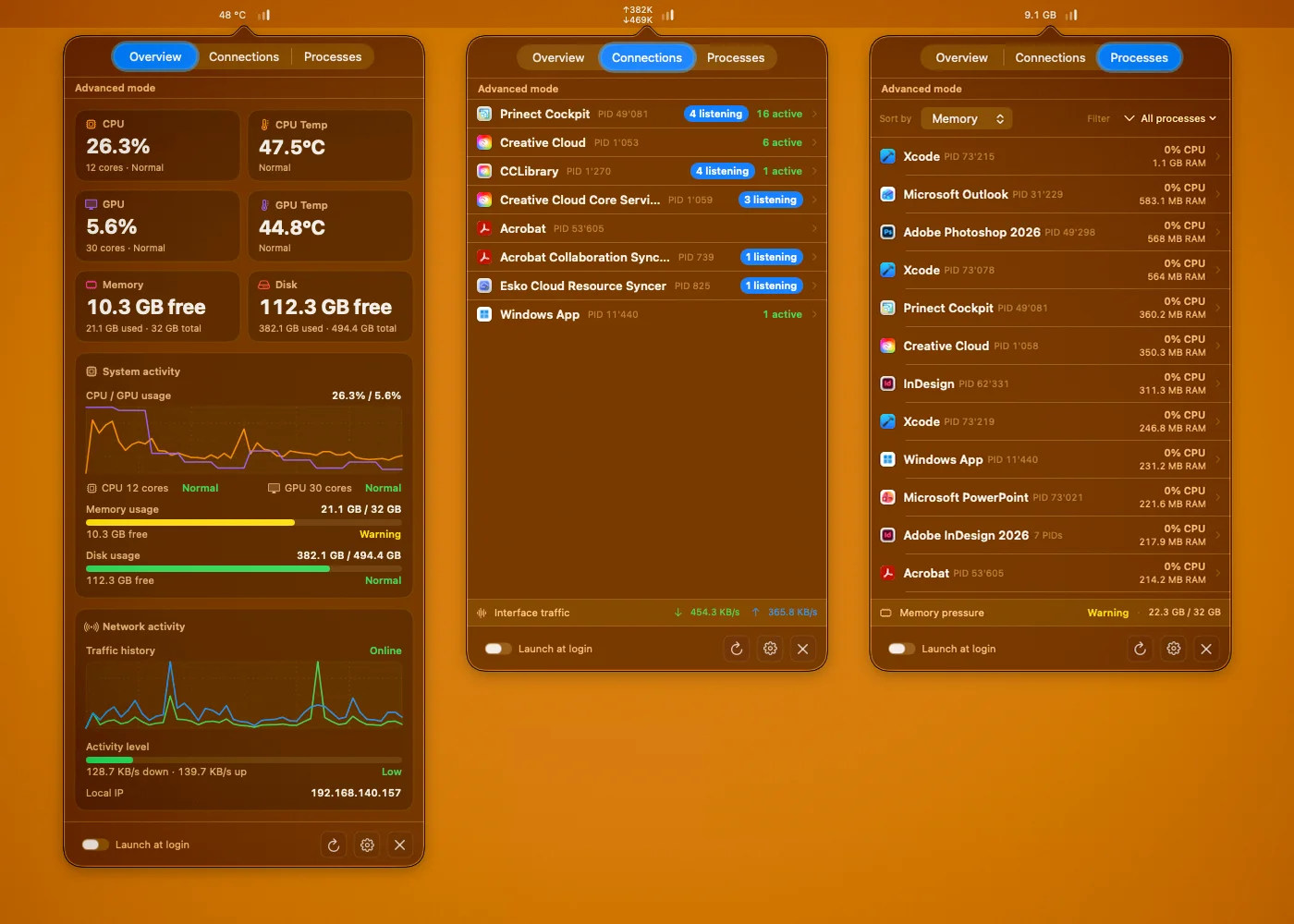
Activity Monitor and Terminal can tell parts of the story, but they do not give you a compact menu bar view focused on live network activity. NET Status helps you see when a process is talking, which ports are listening, how much traffic is moving, and whether system load is part of the problem.
Two ways to use NET Status
NET Status is designed around a simple split. The Mac App Store app works on its own with Core monitoring for traffic and system activity. The optional NET Status Companion only extends that app with Advanced process, connection, GPU, and temperature diagnostics.
- Core mode runs on its own from the Mac App Store
- Advanced mode is powered by the optional NET Status background companion
- The background companion is not a standalone product and requires the Store app
How Advanced mode works
- Install NET Status from the Mac App Store.
- Download and launch the optional NET Status background companion from benwie.ch.
- Complete the one-time setup so the background companion can keep running quietly.
- NET Status switches to Advanced mode automatically when the Store app and background companion are paired.
The background companion is not a standalone app. It works together with the Mac App Store version of NET Status.
Monitoring
- Core mode with live traffic, CPU, memory, disk, battery, and network activity overview
- Advanced mode with grouped process and connection views plus listening ports
- TCP and UDP visibility with local and remote addresses and ports
- Traffic rates for active interfaces, including recent VPN activity
- Per-process CPU usage and resident memory visibility
- GPU usage plus CPU and GPU temperatures in Advanced mode
- Configurable Overview cards with drag-and-drop layout
- Menu bar text modes for network, CPU, GPU, memory, disk, battery, and temperatures
- Grouped connection counts and clearer protocol and state context
- Compact live overview for traffic, system load, and diagnostics in one menu
Designed for macOS
- Native SwiftUI interface with light and dark mode support
- Fast refresh cycle tuned for live diagnostics
- Menu bar workflow first, without requiring Terminal commands
- System-aware details such as CPU and GPU load, memory pressure, and disk state
- Store-safe Core mode with an optional direct Companion for Advanced diagnostics
- Built as a lightweight native utility instead of a network suite
No data collected
NET Status is an on-device utility. No external servers, no analytics, no tracking.
Read the current privacy policy.